Skip to content
Scan·Serve·Settle
012345678901234567890123456789012345678901234567890123456789012345678901234567890123456789
What Eatomatic is
ONE SYSTEMONE SYSTEM

Eatomatic isn't another billing machine. It's the system your whole restaurant sits on — guest, waiter, kitchen, manager and head office.

You pay for the software. The software then runs your service. Guest orders on their phone. Waiter runs the floor on theirs. Kitchen sees the same ticket. You get the day, added up.

Made for India first. GST, UPI, Razorpay, Aadhaar and PAN are built in — not bolted on later. Powered by SpiceBot Artisanal Intelligence.

One loop, start to finish
  1. Guest
  2. QR
  3. Menu
  4. AI
  5. Order
  6. Kitchen
  7. Waiter
  8. Payment
  9. Review
  10. Points
  11. Reports
  12. Stock
  13. Manager
  14. Head office
Where we run

India first. The same system everywhere we open.

Hover a market. The globe keeps turning as you scroll. contact@madeiteasy.online · +91-9571410883

India

India

UAE

UAE

United States

United States

United Kingdom

United Kingdom

Singapore

Singapore

Talk to us

Talk to us

  1. IndiaGST, UPI, Razorpay, Aadhaar and PAN. This is the home market. Built here first.
  2. UAEAlready modeled. Same restaurant loop — not a second product.
  3. United StatesAlready modeled. The guest still orders from the table. Local money later.
  4. United KingdomAlready modeled. One system, from café to brand, wherever you open next.
  5. SingaporeAlready modeled. Same desk, same kitchen, same guest phone.
  6. Talk to uscontact@madeiteasy.online · +91-9571410883
The whole loop

One restaurant. One system.

Twelve things happen between a guest sitting down and you seeing the numbers. On Eatomatic it's one movement, not twelve handovers. Keep scrolling — each step takes over the last.

01

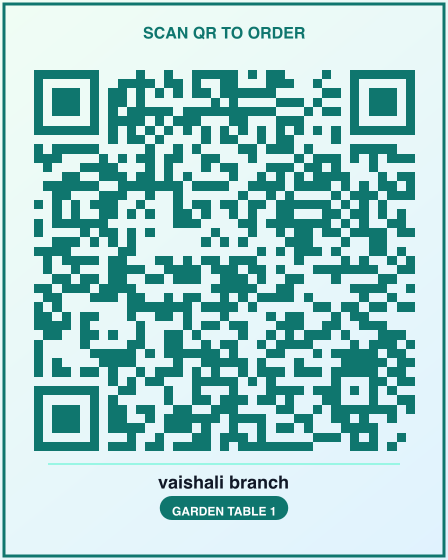
Guest scans the QR

Table QR — scan to order

One code per table. It opens in the phone they already have. No app store.

  1. 01Guest scans the QROne code per table. It opens in the phone they already have. No app store.
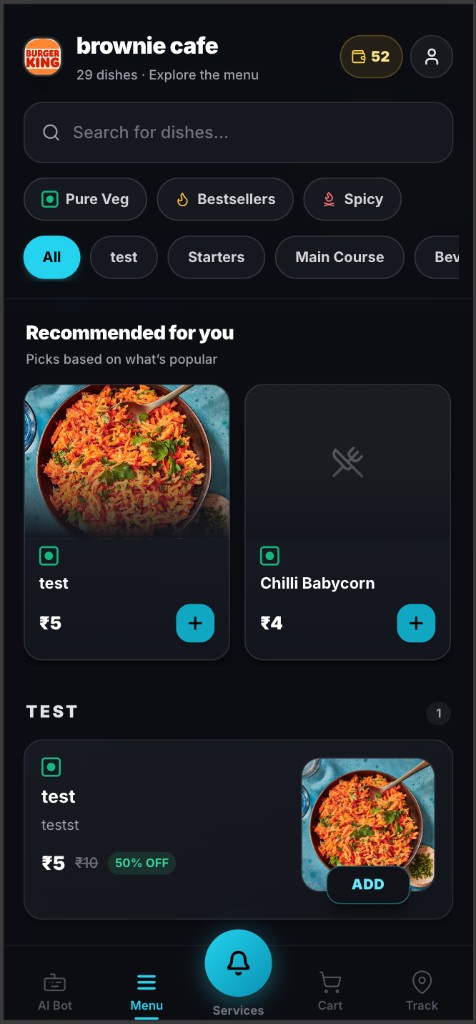
  2. 02Guest reads the menuSizes, add-ons, what's finished — the real menu, not last year's print. SpiceBot sits on the same screen.
  3. 03SpiceBot suggests a dishSpiceBot reads the menu and the moment, and offers something that fits. Veg, spicy, budget — in the guest's words.
  4. 04Order hits the kitchenWhat the guest tapped is what your chef sees. Confirmed, cooking, ready. Nobody types it again.
  5. 05Waiter sees the table light upThe waiter panel lights up. Table occupied. Dish ready. A call for water. On the phone they already carry.
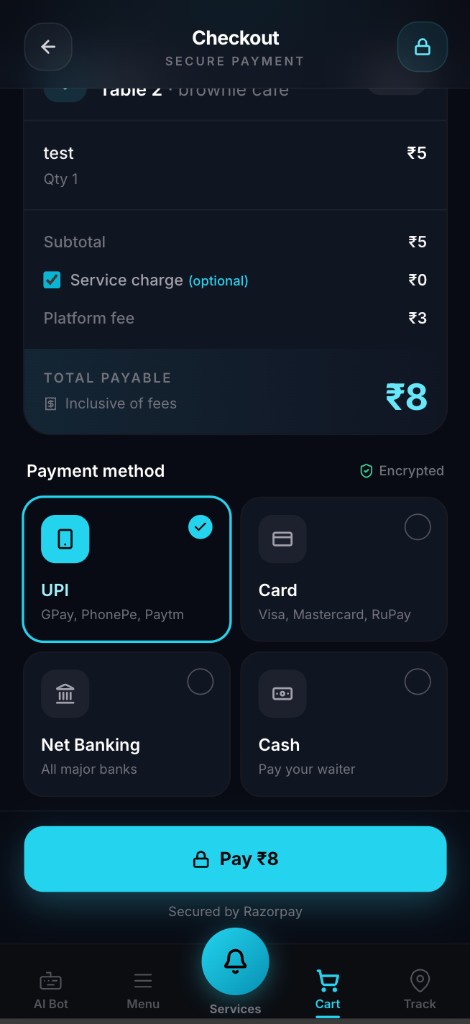
  6. 06Guest paysUPI, card or cash. GST on every line. The waiter or the guest can close it.
  7. 07Stock goes downThe dish sells, the recipe comes off the shelf. Low stock shows up before you run out.
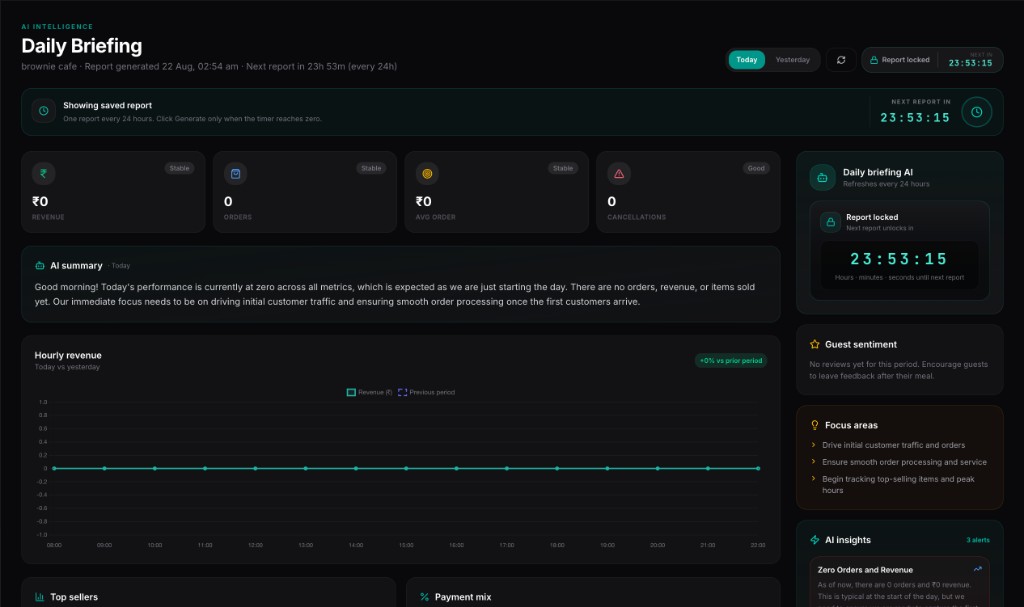
  8. 08Manager gets the briefingThe manager opens the laptop. SpiceBot already wrote how last night went — sales, busy hours, what to push today.
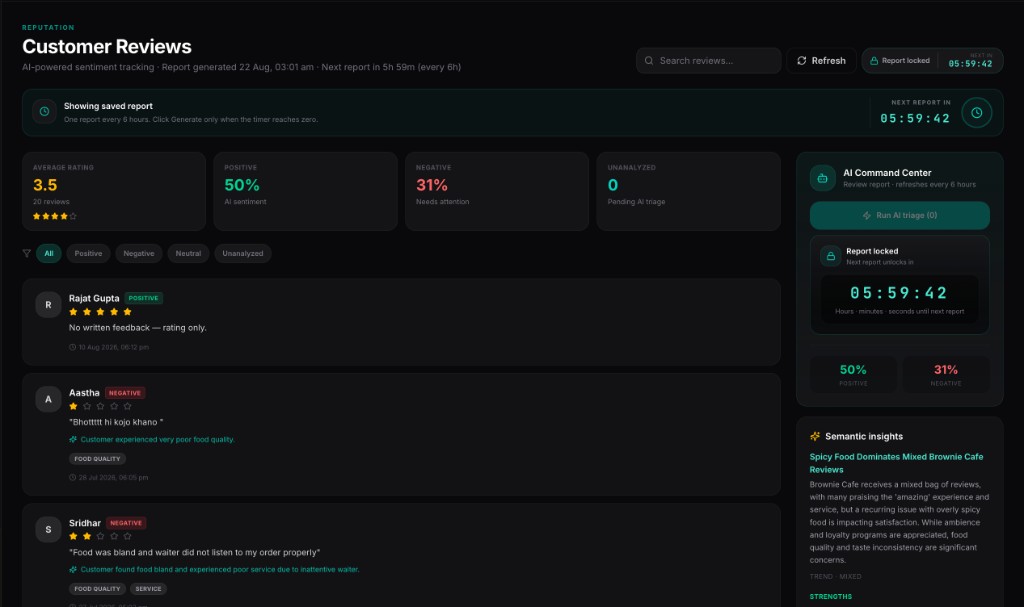
  9. 09Guest leaves a reviewThe review arrives attached to the order it came from. SpiceBot says what it actually means.
  10. 10Points get addedPoints land on the guest. Next time they sit down, you know who they are.
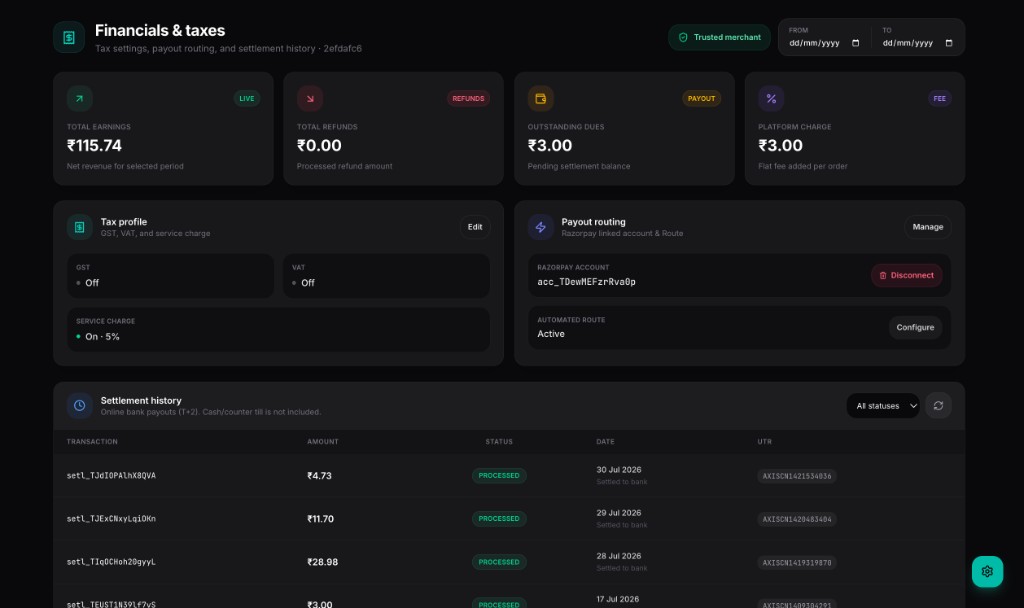
  11. 11Money reaches your accountYour share is split out and sent to your Razorpay account. Cash fees come off later digital payouts.
  12. 12Head office sees the outletHead office sees the outlet on the same system. No second login. No rebuild.
What's inside

Seven parts. One system under all of them.

01Guest QR

Your guest's phone is the menu.

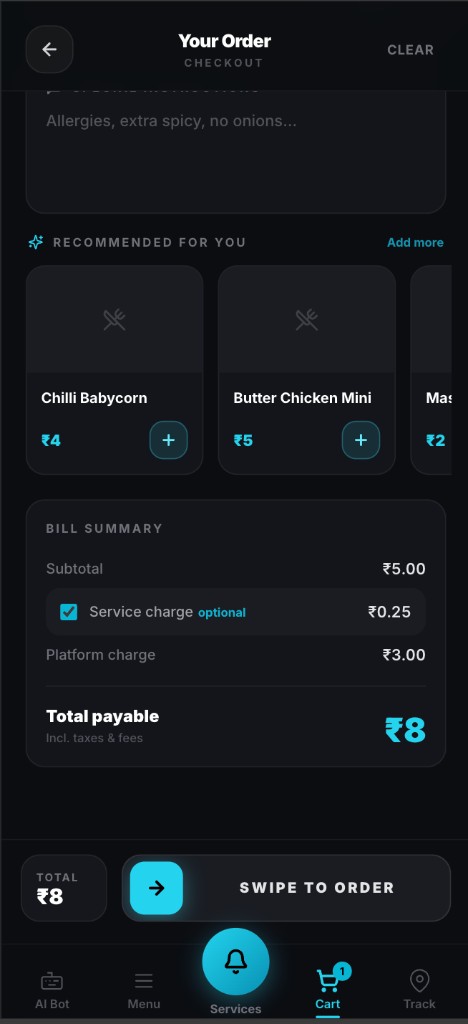
Every table gets a QR code. Your guest scans it, sees the menu, orders and pays — all on their own phone. Nothing to download. No waiting to catch someone's eye.

The table takes the order. Your staff stop being messengers.

  1. Scan
  2. Menu
  3. Ask AI
  4. Order
  5. Pay
  6. Track
  7. Review
  8. Points
  • QR ordering at every table
  • Opens in the browser — no app
  • Sizes and add-ons
  • SpiceBot menu chat
  • UPI, card and cash
  • Live order tracking
  • Call for waiter, water, bill
  • Reviews attached to the order
  • Loyalty points
Guest menu
Guest checkout
UPI, card, cash
Guest menu
02Waiter panel

Your waiter's phone is the floor.

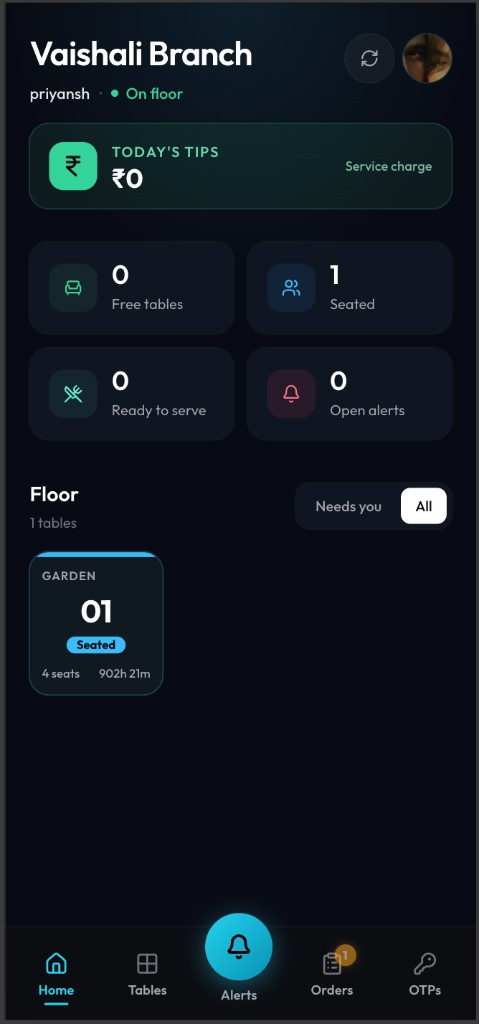
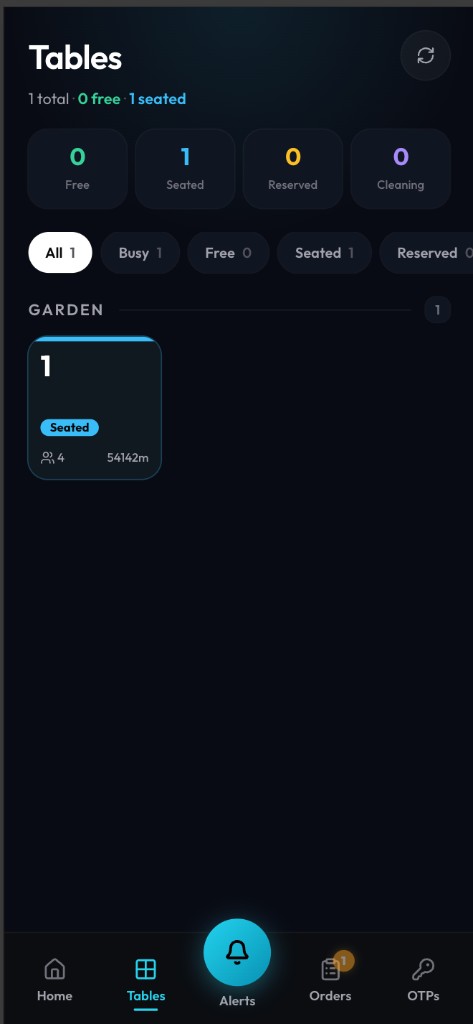
Waiters, cashiers, hosts and captains each get a phone for their job. Tables, guest calls, ready dishes and OTPs — live. Nobody queues at the one machine by the till.

WhatsApp is not a waiter system. This is.

  1. Home
  2. Tables
  3. Alerts
  4. Serve
  5. Collect
  6. OTP
  • Live table map on a phone
  • Seat, free, or mark for cleaning
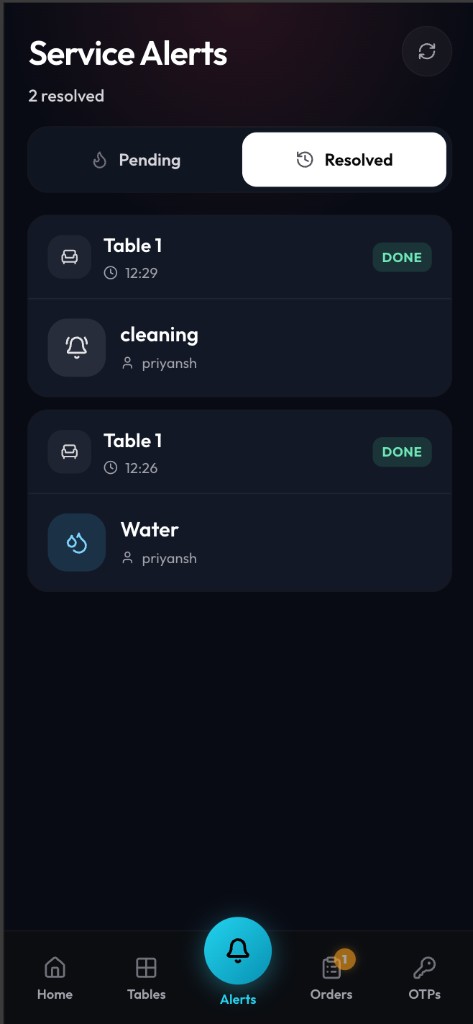
  • Guest calls as they happen
  • Ready-to-serve from home
  • Cash or UPI at the table
  • Guest OTP for the table
  • A screen per role
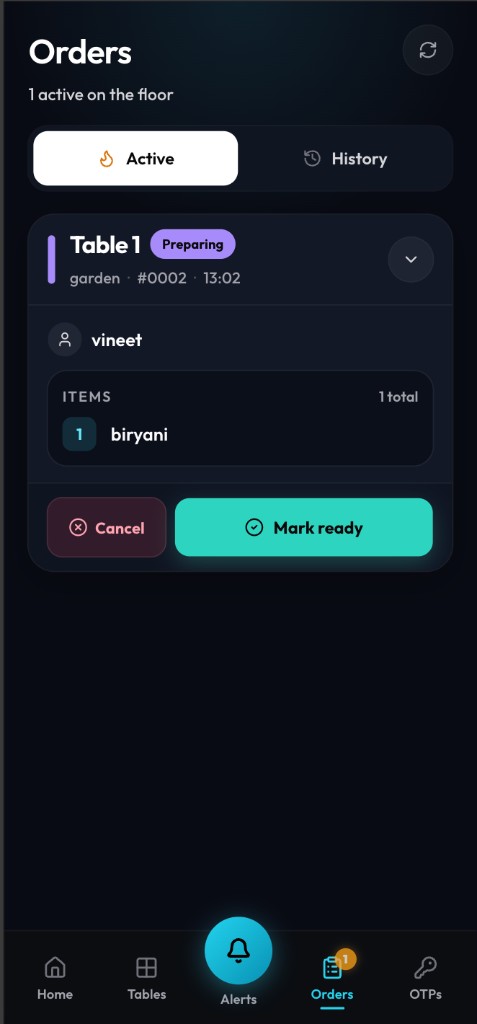
  • Updates as the kitchen cooks
Waiter · home
Waiter · tables
Waiter · orders
Waiter · alerts
Waiter · home
03Kitchen

The order reaches the kitchen. Nobody types it twice.

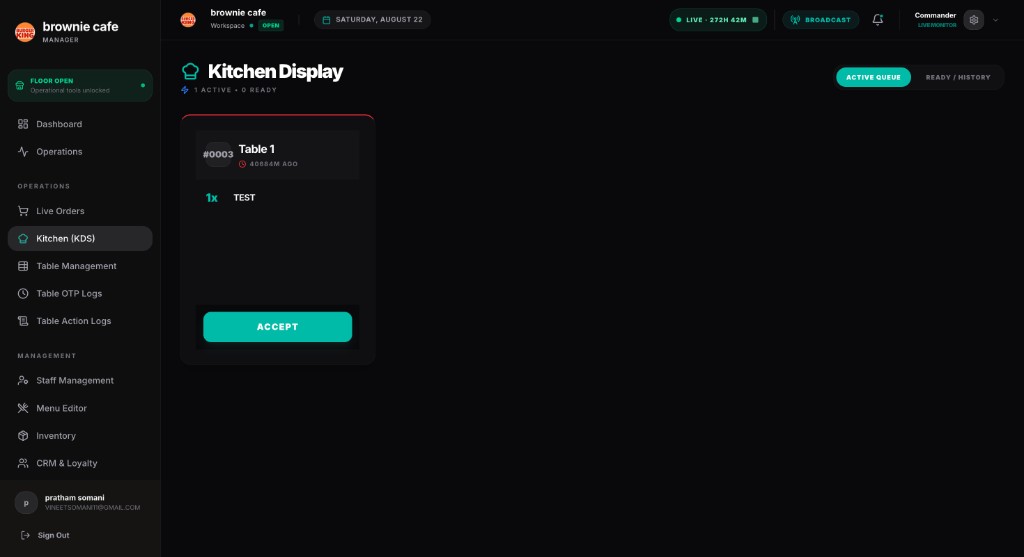
What your guest tapped is what your chef sees — on a screen, updating live. No shouting across the pass. No paper slip that goes missing.

The ticket is the order. Not a copy of the order.

  1. Confirmed
  2. Cooking
  3. Ready
  4. Served
  • Kitchen display screen
  • Orders arrive live
  • Dine-in, takeaway and delivery
  • Rush and recall
  • Cooking-time estimates
  • See how busy the kitchen is
Kitchen display
Kitchen display
04SpiceBot

SpiceBot tells you how last night went — before you ask.

It reads the same live restaurant your floor and kitchen are running. Then it answers where you actually need it: in your guest's menu, on the kitchen screen, and in your morning.

AI that sits in the shift — not a chatbot on a marketing page.

  1. Guest
  2. Menu
  3. Kitchen
  4. Reviews
  5. Reports
  6. You
  • Morning briefing
  • Ask it anything about the restaurant
  • Written reports
  • What to push, what to drop
  • Menu descriptions written for you
  • Cooking-time estimates
  • What your reviews really say
  • Menus in other languages
  • Dish suggestions
  • Kitchen load
  • Upsells and combos
SpiceBot daily briefing
Customer reviews
SpiceBot daily briefing
05Money

UPI, card, cash. GST on every line.

Three ways to pay, one bill, tax worked out as you go — and a payout that already knows what's yours. Built for how Indian restaurants actually take money.

The bill, the tax and the payout are one movement.

  1. Collect
  2. Add GST
  3. Split
  4. Settle
  5. Payout
  • Razorpay
  • Stripe for overseas cards
  • Split payouts via Razorpay Route
  • UPI, card and cash
  • GST on every line
  • Your share, split automatically
  • Settlement history
  • Cash fees netted off later
Financials and GST
Financials and GST
06Manager panel

Know how the day went, without asking anyone.

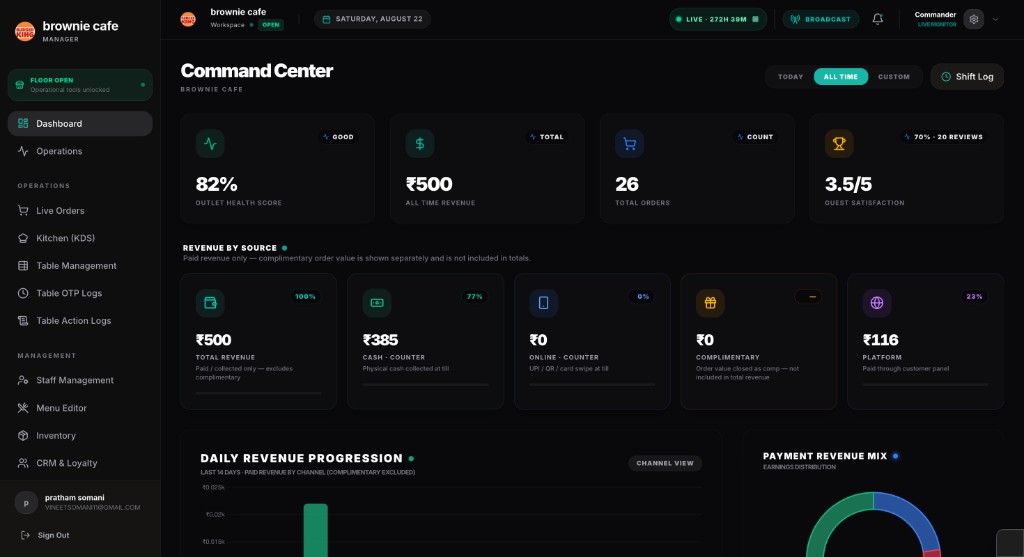
Sales, orders, average bill, busy hours, what sold, who worked, what's running out, what guests said. One screen, updated as it happens. You open the day. You close it.

The morning briefing is sitting there before you unlock the door.

  1. Open
  2. Orders
  3. Staff
  4. Menu
  5. Rescue
  6. Close
  • Command centre — sales and health
  • Open and close the day
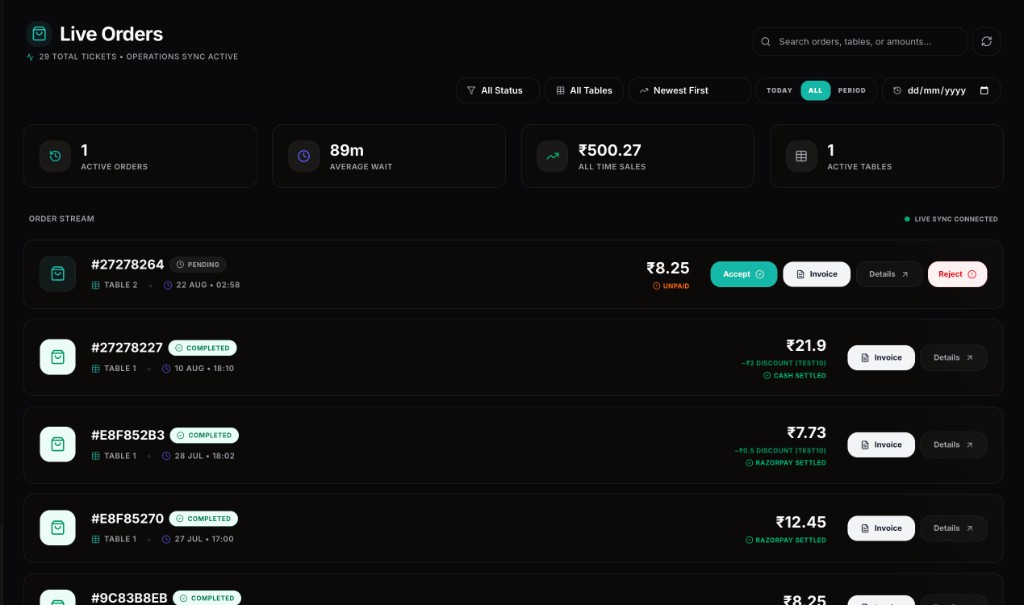
  • Live order stream — accept, reject, invoice
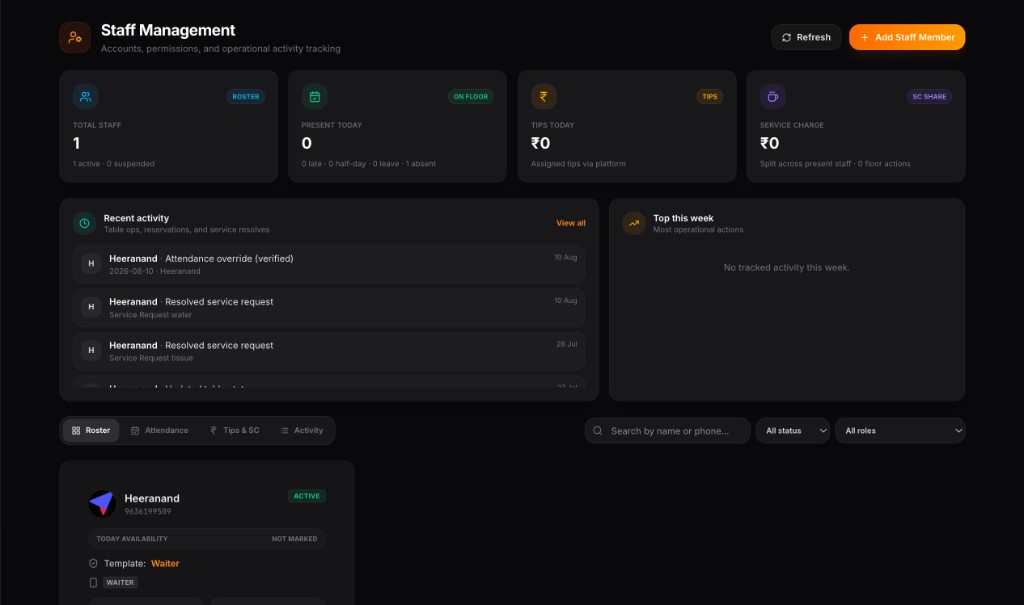
  • Staff, attendance, tips, activity
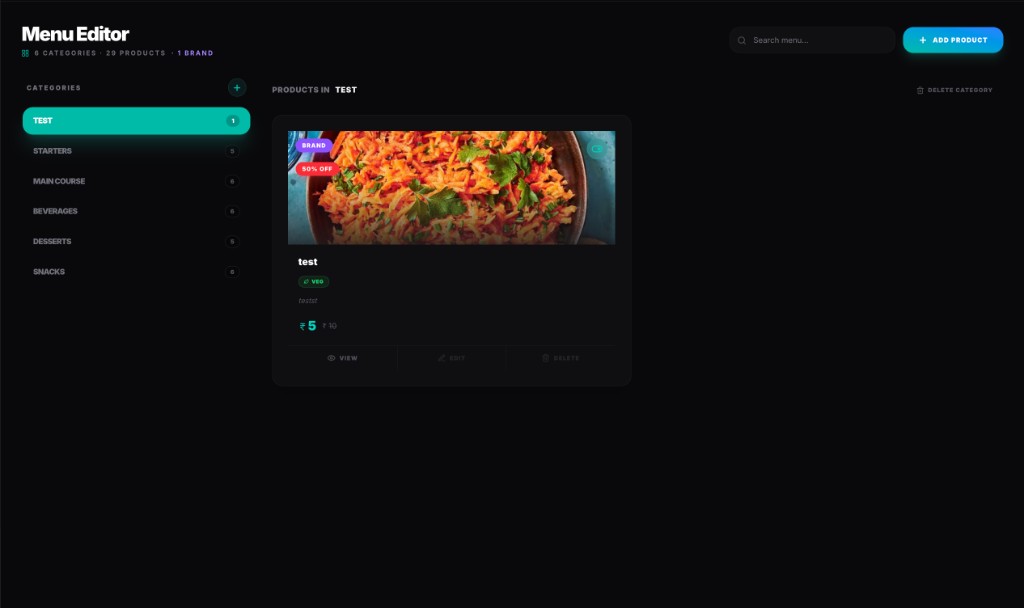
  • Menu editor — dishes, sizes, offers
  • Table actions — who asked, who handled it
  • Food rescue — surplus as a donation
  • Performance insights and AI reports
  • Support hub — tickets and a call
  • Tables, QR codes, OTP logs
  • Stock and wastage
  • Guests and loyalty
Manager command center
Live orders
Staff management
Menu editor
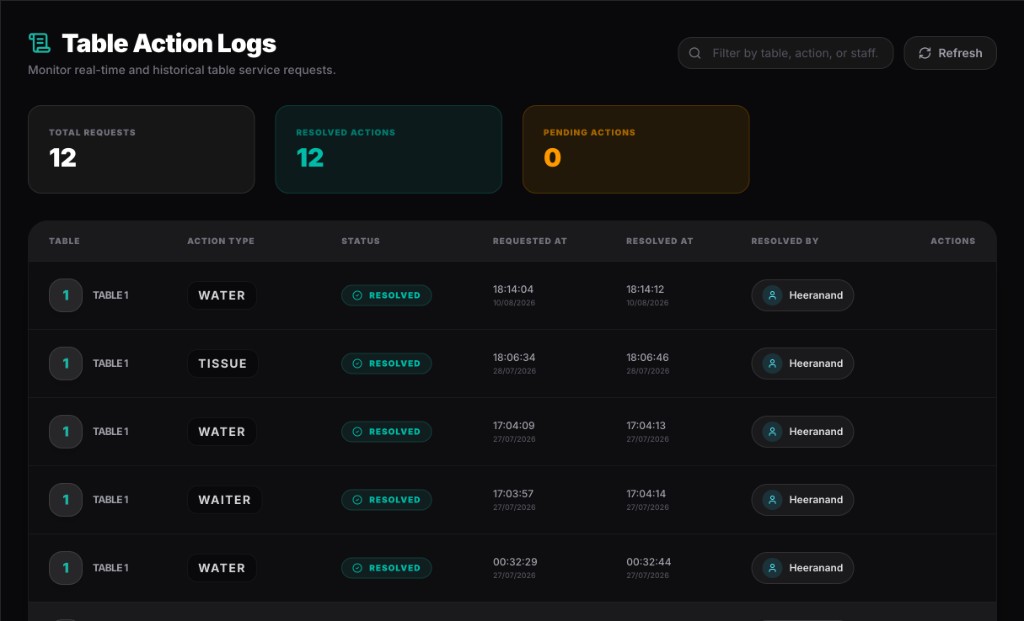
Table action logs
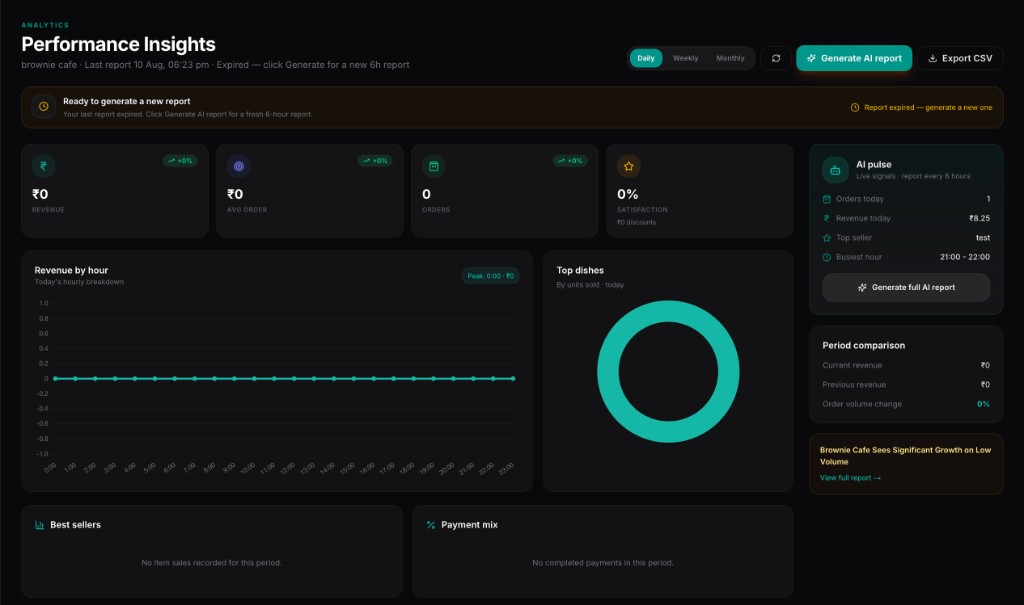
Performance insights
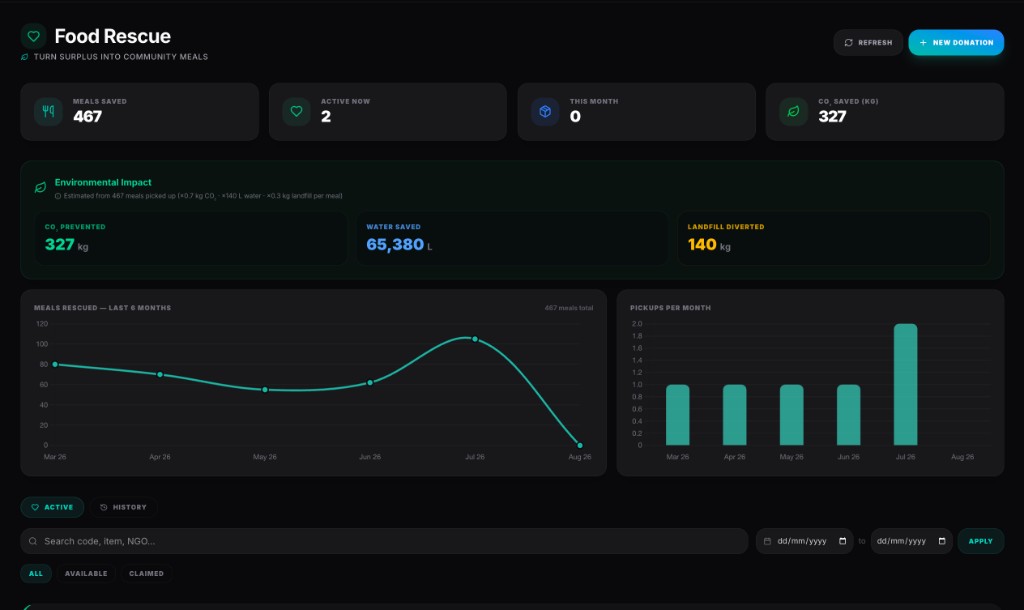
Food rescue
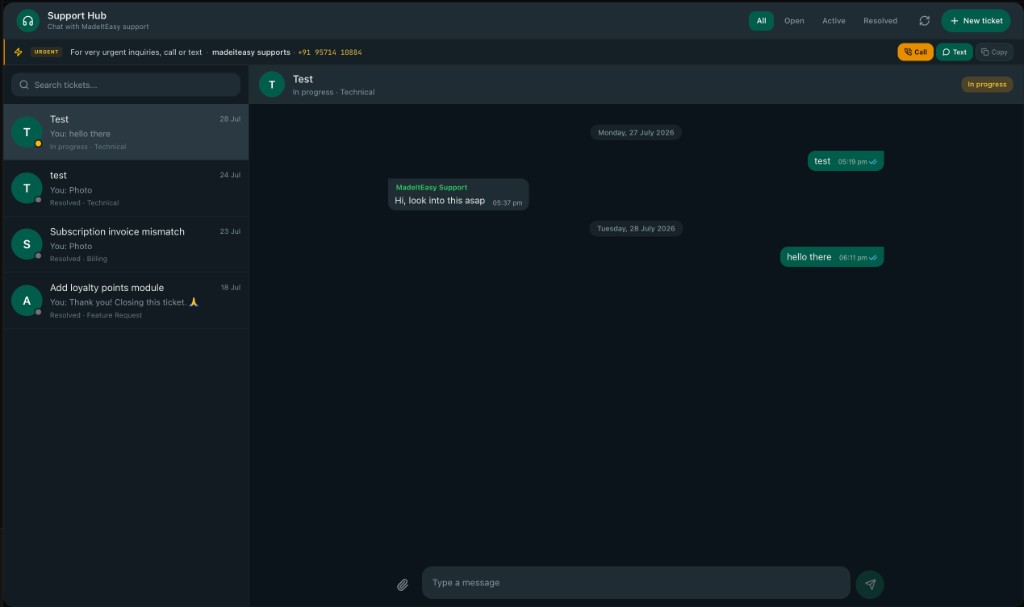
Support hub
Table management
Inventory
CRM and loyalty
Financials and GST
Manager command center
07Franchise HQ

One brand. Every outlet. One system.

The system your first restaurant started on is the one your twentieth runs on. Menus, guests and numbers roll up on their own — you don't set it all up again.

Head office sits above the outlets. Not in a second product.

  1. Head office
  2. Outlet A
  3. Outlet B
  4. Outlet C
  5. Outlet D
  • One menu, pushed everywhere
  • One guest list for the brand
  • Compare outlet against outlet
  • Approve new outlets
  • Broadcasts to every floor
  • Loyalty across all outlets
  • HQ pays, or each outlet pays
  • Orders across the network
  • Brand support desk
Franchise HQ
Franchise HQ
Three products. One restaurant.

A waiter on the floor. A manager at the desk. A brand above both.

Most POS tools give everyone the same screen. Eatomatic does not. The waiter gets a phone. The manager gets the day. Head office gets the network. Same live orders underneath.

01Waiter panel

Your waiter's phone is the floor.

Waiters, cashiers, hosts and captains each get a phone app for their job — not one till at the counter that everyone queues for.

The guest already ordered on their phone. Staff should not have to re-type it.

Home shows what needs you now: a table asking for water, a dish that's ready to serve, a table that needs cleaning. You don't hunt through a list. The urgent things come to you.

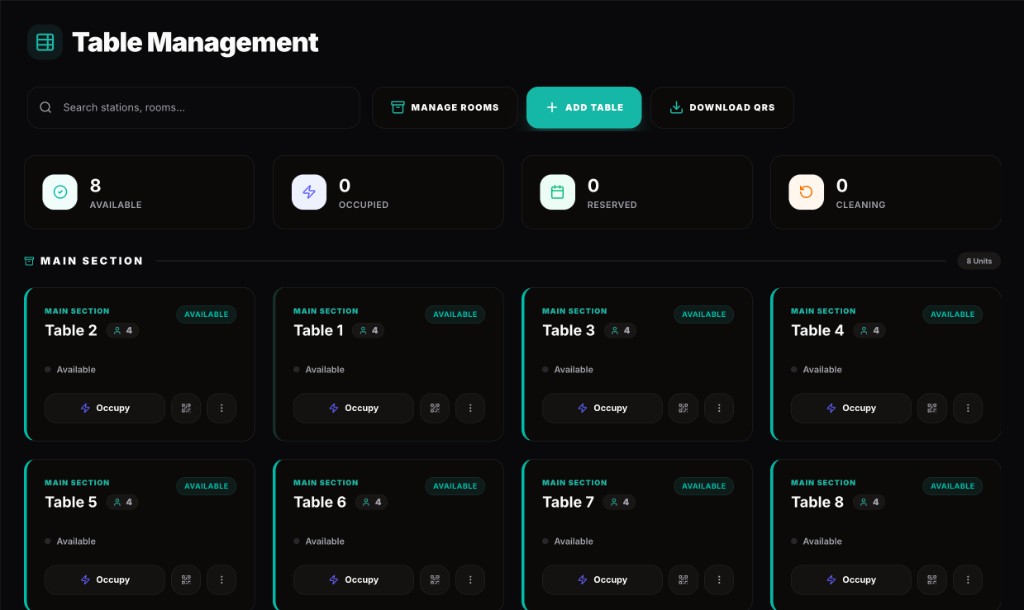
Tables sit on a live map, grouped by room. Available, occupied, reserved, cleaning — tap one to seat a guest or free it when they leave.

When a guest taps Call waiter, Water, Tissue, Clean table or Bill on their phone, it lands as an alert on yours. Resolve it when you've done it. Nobody shouts across the room.

Orders move on the same screen: confirm, cooking, ready, served, done. Cash or UPI at the table or the counter — the bill is already made.

If a guest needs to log in at the table, you read them a one-hour OTP. No shared password. No paper pad.

  1. Home
  2. Tables
  3. Alerts
  4. Orders
  5. OTPs
Waiter · home
Waiter · tables
Waiter · orders
Waiter · alerts
Waiter · home
  • WaiterTables, serve, and the calls that come from the QR.
  • CashierSee the bill. Take cash or online. Close the order.
  • HostThe door and the floor map — who sits where.
  • CaptainThe waiter tools, plus a view of the whole team.
  • Runs on the phone they already carry.
  • Each role sees only their job.
  • Guest calls arrive live. No WhatsApp group.
  • The kitchen ticket and the waiter screen are the same order.
02Manager panel

One screen for the whole day — open to close.

This is the command centre for one restaurant. You start the day, watch the floor, fix the menu, pay staff, and read what last night actually did.

You should not have to ring the captain to find out how the night went.

Open operations and the floor unlocks — QR, kitchen, waiter app. Close it and guests cannot order. The day is a real session, not a guess.

The dashboard is the live room: sales, orders, average bill, how people paid, outlet health. SpiceBot's briefing sits on the same morning screen.

Live orders, kitchen display, table map and printable QR codes are one click apart. You can accept a ticket, reprint a QR, or take a complimentary bill without leaving the desk.

Staff is a roster with real jobs: waiter, cashier, host, captain, kitchen. Attendance, tips and a log of who did what — including which waiter resolved a table request — tied to the same open day.

Menu editor, stock, food rescue, guests, reviews, GST and Razorpay payouts live here too. Surplus can be listed as a donation. Analytics and an AI report sit on the same morning screen. Support is a ticket from the panel, not a WhatsApp to a vendor.

Manager command center
Live orders
Staff management
Menu editor
Table action logs
Performance insights
Food rescue
Support hub
Table management
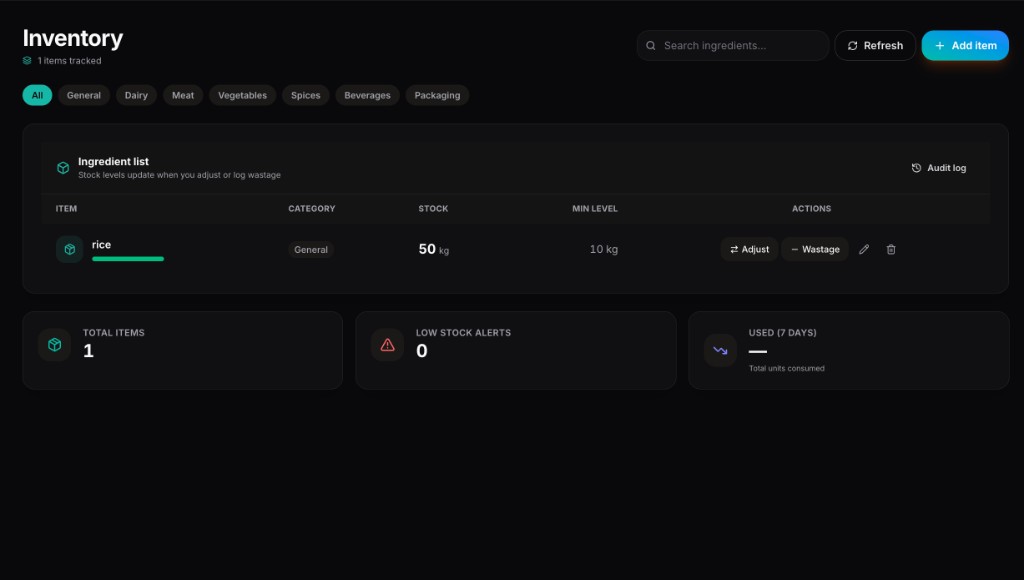
Inventory
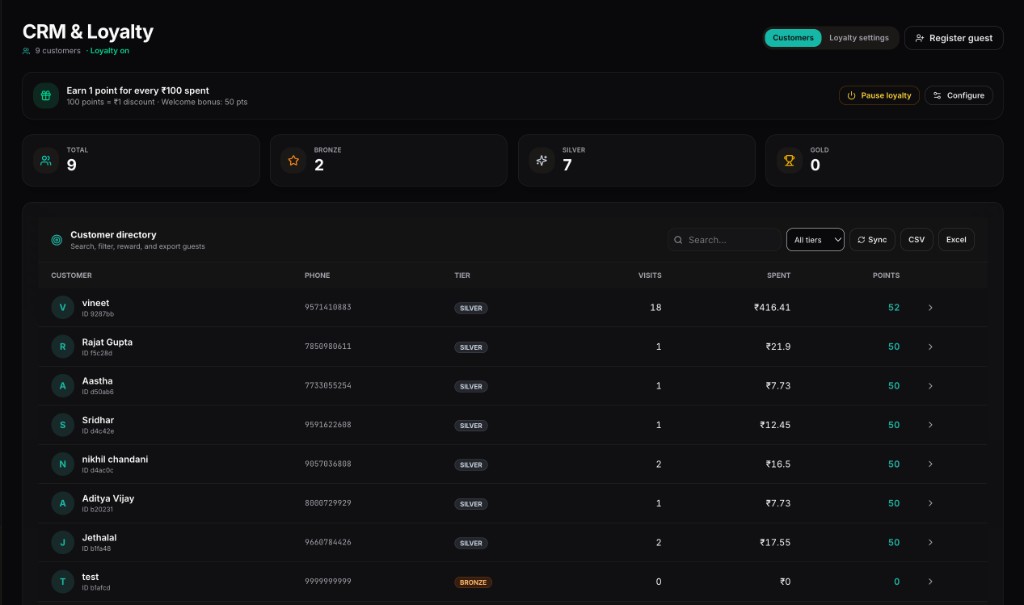
CRM and loyalty
Financials and GST
Manager command center
  • Command centreSales, orders, health, how people paid — live.
  • OperationsOpen the day. Close the day. Attendance sits on that session.
  • Live ordersEvery ticket. Accept, reject, invoice. Cash, online, or complimentary.
  • Kitchen (KDS)The same tickets the chef sees, from your desk.
  • Tables & QRRooms, capacity, status, bulk QR download, table transfer.
  • Table actionsWater, tissue, waiter — who asked, who resolved it, how long.
  • StaffRoster, attendance, tips, activity. Roles, not one login.
  • Menu editorDishes, sizes, add-ons, photos, veg tags, item offers.
  • Food rescueList surplus. Track pickups. Not a bin run at close.
  • AnalyticsRevenue, peak hours, top dishes. SpiceBot writes the report.
  • StockIngredients, recipes, wastage, low-stock alerts.
  • CRM & loyaltyWho came back, what they spent, what they earned.
  • MoneyGST, service charge, Razorpay account, settlements.
  • Reviews & reportsWhat guests said. What SpiceBot thinks it means.
  • SupportTickets to us from the panel. Call when it cannot wait.
  • Open and close is a product, not a habit.
  • QR, kitchen, money and staff share one clock.
  • SpiceBot briefs you before the first guest sits.
  • GST and UPI are settings, not a plugin.
03Franchise HQ

Every outlet on the same system. Head office on top.

The outlet still runs Eatomatic. Head office sees all of them — one menu, one set of numbers, one place to say yes to a new site.

Outlet two should not mean a second software stack.

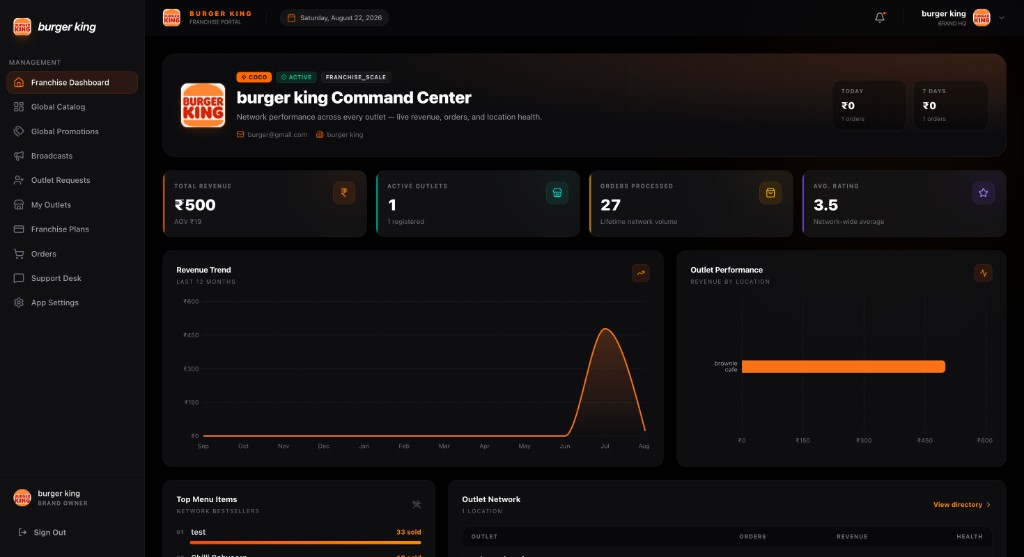
The command centre rolls up the network: revenue, orders, outlet health, what sold. You compare site against site on the same yardstick.

The global catalogue is the brand menu. Change a dish once. Outlets get it. Promotions work the same way — one code, every site or the ones you pick.

A new outlet requests to join. You approve or send it back. Broadcasts go to every floor or just one. Support tickets from outlets land on one desk.

Billing can be HQ-pays (one bill for the brand) or each outlet pays its own. Starter, Growth or Scale — ten sites, twenty-five, or no cap.

Guests belong to the brand. Points earned in one outlet work in the others. You do not rebuild CRM per address.

Franchise HQ
Franchise HQ
  • Brand command centreNetwork sales, orders, health, top sites.
  • Global catalogueOne menu. Push it to every outlet.
  • Global promotionsOne offer. All sites, or the ones you choose.
  • BroadcastsA note to every floor, or to one.
  • Outlet requestsA new site asks to join. You say yes or no.
  • My outletsSearch, sort, health, KYC, orders, ratings.
  • Plans & billingHQ pays, or each outlet pays. You pick.
  • OrdersLook across the network without logging into each site.
  • Support deskOutlet tickets, one queue.
  • Brand settingsProfile, terms, who the brand is on paper.
  • First restaurant and twentieth restaurant use the same product.
  • Menu and offers live at brand level — outlets don't drift.
  • One bill at HQ, if you want it that way.
  • Loyalty follows the guest, not the pincode.
Your screen

Open your laptop. The day is already added up.

Sales, orders, average bill, busy hours, what sold, how people paid, who worked, what's running out. SpiceBot writes the briefing before you unlock the door. You don't ring the captain to find out how last night went.

This is one outlet. Staff, menu, stock, GST, reviews and Razorpay payouts live here. If you have more outlets, head office sits on top of the same system — it does not replace this desk.

  1. Open
  2. Orders
  3. Staff
  4. Menu
  5. Close
Manager command center
Live orders
Staff management
Menu editor
Table action logs
Performance insights
Food rescue
Support hub
Table management
Inventory
CRM and loyalty
Financials and GST
Manager command center
  • Sales and busy hours
  • Live orders
  • Staff and attendance
  • Stock running out
  • Food rescue
  • GST on every line
  • Razorpay payouts
Setting the desk…
How we're different
NOT A TILL.NOT A TILL.

Most Indian POS software was built around the billing counter, then grew apps around it. We started at the table instead.

Here's the honest version. Us first — then Petpooja, DotPe, Restroworks (Posist) and LimeTray. Everything in their columns comes from their own websites.

  • Where does the guest order?
    Us · EatomaticThe QR is the system. The guest's phone is the ordering screen, by default, on every plan.QR-first, not QR-added
    PetpoojaScan & Order is sold as a separate add-on that plugs into the POS.
    DotPeQR Solutions is its own product line. They also integrate with other POS systems.
    RestroworksRestroScan — QR ordering in a customer-experience suite, next to the POS.
    LimeTrayWebsite, own app and aggregator orders. Table QR is not how they introduce the product.
  • How does the kitchen get the order?
    Us · EatomaticA live ticket on a screen. Confirmed, preparing, ready, served — updating as it happens.A live screen, not a printer
    PetpoojaStation-wise KOT to a printer, or a KDS they sell as an add-on.
    DotPeRista POS includes KOT as part of restaurant management.
    RestroworksA native Kitchen Display System in the kitchen suite.
    LimeTrayA kitchen display that shows orders in real time.
  • What does the waiter use?
    Us · EatomaticWaiter, cashier, host and captain share one phone app. Each sees their job. Guest calls land there live.A waiter panel, not a group chat
    PetpoojaStaff use a Captain app and a KDS around the billing POS.
    DotPeA waiter application, listed among other features.
    RestroworksTablet ordering and server management on the POS.
    LimeTrayA mobile cloud POS for the floor.
  • Does the guest need an app?
    Us · EatomaticNothing to install. It opens in the browser your guest already has.No download, ever
    PetpoojaGuests scan in the browser. Staff still need Captain and KDS apps.
    DotPeCamera QR, no extra guest app. They also sell a waiter application.
    RestroworksRestroScan in the browser, plus a branded guest app if you want one.
    LimeTrayThey sell the restaurant its own mobile app.
  • How do you get more features?
    Us · EatomaticOne plan. Ordering, kitchen, payments, stock, guests and reports are all already in it.One system, not a shopping list
    PetpoojaAn App Marketplace — you add and pay for apps as you need them.
    DotPeA suite: digital storefront, QR, Rista POS, payments, capital.
    RestroworksA platform of named products, plus 500+ third-party integrations.
    LimeTrayA suite — website, app, POS, KDS, CRM, loyalty, aggregator merge.
  • What does the AI do?
    Us · EatomaticSpiceBot helps your guest choose, tells the kitchen what's coming, and briefs you before service.AI in the middle, not on the side
    PetpoojaThe billing product is not built around an AI layer.
    DotPeNot described as an AI product. QR, POS, payments and a waiter app.
    RestroworksML order-forecasting in the kitchen suite. Not a guest assistant on the menu.
    LimeTrayChatbots collect feedback. Cooking-time prediction on the KDS. Not a menu assistant.
  • What hardware do you buy?
    Us · EatomaticA browser. Phones your staff already carry, and a screen in the kitchen.Start with what you own
    PetpoojaBilling terminals and counters, with 200+ hardware integrations.
    DotPeBuilt to sit with leading POS hardware, plus QR on the table.
    RestroworksCloud POS, tablets, kiosks, and 500+ partner integrations.
    LimeTrayA mobile cloud POS. Hardware is not the story they lead with.
  • What happens at outlet number two?
    Us · EatomaticYou step onto the franchise rungs — one menu, one guest list, one set of numbers, up to unlimited outlets.One ladder, all the way up
    PetpoojaMulti-outlet is handled inside the POS product.
    DotPeRestaurants, cafes and QSR chains from one dashboard.
    RestroworksBuilt for large chains and franchise networks — not as an SMB tool.
    LimeTrayMulti-brand, multi-outlet — especially cloud kitchens.
  • What does it cost to find out?
    Us · EatomaticFree on five tables. Live in a day. No card, no demo call first.Try it tonight
    PetpoojaPricing is quoted per restaurant, on request.
    DotPeA demo first. Onboarding in about three days. A per-transaction service fee.
    RestroworksSold as an enterprise platform. You start with a conversation.
    LimeTrayA demo to start. No free dine-in floor on the public site.
Where the others still winThree things worth knowing before you switch:
  • Petpooja bills offline. If your internet drops mid-service, that matters — ask us how we handle it for your setup.
  • Petpooja lists 200+ hardware integrations and Restroworks lists 500+ partners. If you have a cupboard of existing kit, some of it may not be plug-and-play with us.
  • LimeTray and Petpooja have long-established aggregator links. If most of your revenue is Swiggy and Zomato, talk to us before you move.
Why us
NOT ANOTHER POS.NOT ANOTHER POS.

Fewer people taking orders. Faster tables. The night, already counted.

  • ManpowerThe table orders. Staff serve.
  • AutomationTickets, stock, GST, payouts.
  • ExperienceScan, ask, pay, review — one phone.
  • The moneyOn the bill. In your account.
01Manpower

The table takes the order

Your guest's phone is the menu. Waiters stop writing it down. They serve.

  • Every table
  • No guest app
  • Staff serve
See it
02The floor

Water, bill, waiter — from the chair

They tap. It lands on the waiter's phone. Nobody shouts across the room. WhatsApp stays for gossip.

  • Live alerts
  • One phone per job
See it
03Automation

Nobody types the order twice

What they tapped is what the chef sees. Live. No paper slip that goes missing at the pass.

  • Live ticket
  • Confirmed → ready
See it
04Turns

Pay where they sit. Turn the table.

UPI, card or cash on the phone they already have. The till stops being a queue.

  • UPI
  • Card
  • Cash
See it
05The money

Sell a dish. Stock drops. Tax is on the bill.

Inventory deducts when it sells. GST on every line. Your share goes out through Razorpay.

  • GST
  • Stock
  • Payouts
See it
06The morning

How last night went — before you ask

SpiceBot briefs the manager: what sold, when it peaked. Not a WhatsApp dump at eleven.

  • Briefing
  • Reviews
  • Menu chat
See it
07The day

Open, serve, attend, close

Attendance, tips, service calls. Many tools stop at the bill. The shift is a product.

  1. Open
  2. Service
  3. Attendance
  4. Tips
  5. Close
  • Open
  • Attendance
  • Tips
  • Close
See it
08They come back

A guest, not a table number

They review on the same phone. Points land. Next visit, you already know them.

  • Reviews
  • Points
  • CRM
See it
09The brand

Outlet two is not a rebuild

Free on five tables. Same system at 500, and at franchise HQ — one menu, one set of numbers.

  • 5 tables
  • HQ
  • One menu
See it
The manager desk

Every order, every request, every person — from one screen.

Live tickets, the roster, the menu, surplus food, the numbers, a support thread, and who handled the call for water. This is the outlet, not a billing counter with apps around it.

01Live orders

Every ticket in one place

Accept, reject, invoice. Unpaid and settled. Tables, amounts, the stream — live from the desk.

  • Accept
  • Invoice
  • Unpaid → settled
02Staff

Who is on, what they did, what they earned

Roster, attendance, tips and a log of who resolved what. Tied to the open day — not a notebook.

  • Roster
  • Attendance
  • Tips
03Menu

Change the dish. The QR menu follows.

Categories, photos, veg tags, offers. Edit it here. Guests see it on the table.

  • Categories
  • Offers
  • Live on QR
04Food rescue

Surplus becomes a meal, not a bin

List extra food as a donation. Track pickups. Close of day does not have to mean waste.

  • List it
  • Pickup
  • History
05Analytics

The numbers, and what they mean

Revenue, peak hours, top dishes, payment mix. SpiceBot writes the report from the same desk.

  • Revenue
  • Peak hours
  • AI report
06Support

A ticket without leaving the panel

Billing, technical, account — a thread with Eatomatic. Call when it cannot wait.

  • Tickets
  • Chat
  • Call
07Table actions

Who asked. Who handled it. How long.

Water, tissue, waiter — from the guest's phone. Resolved by name, with the time on the record.

  • Water
  • Waiter
  • Resolved by
Food rescue

Surplus becomes a meal, not a bin.

Close of day does not have to mean waste. The manager lists extra food as a donation. Superadmin sees it, an NGO can be claimed against it, and the pickup stays on the record.

Turn surplus into community meals.

  1. List surplus
  2. Claim
  3. Pickup
  • Manager

    New donation. Active and history. Search by code, item, NGO. The night’s leftover is a listing, not a bin run.

  • Superadmin

    Every listing, the stats, claim a pickup, keep the NGO list. The same numbers the outlet already sees.

Yearly model — not a live total

If an outlet lists surplus 4 nights a week, 8 portions a night, 50 weeks — that is 1,600 meals in a year. Scale it. Same factors the Food Rescue screen already uses.

  • Meals rescuedmeals
  • CO₂ preventedkg
  • Water savedL
  • Landfill divertedkg

Per meal, as the panel prints it: ≈0.7 kg CO₂, ≈140 L water, ≈0.3 kg landfill. A listing still has to be lawful and fit to give away.

Pricing

Start on five tables. Same system at five hundred.

Free on five tables. After that you pay per restaurant — tell us how big your floor is and we'll point you at the right one.

Amounts from the live billing catalogue.

Restaurant
FreeStart
5 tablesFree

Put it on five tables tonight and see.

  • QR ordering — no guest app
  • Waiter panel for floor staff
  • Tables and GST bills
  • SpiceBot menu chat
DineRun
20 tables₹5/mo

Perfect for small restaurants. Up to 20 tables, AI features, QR ordering.

  • SpiceBot
  • Live orders
  • Menu editor
  • QR ordering — no guest app
  • Discounts
  • Reviews
  • Tables and GST bills
GrowImprove
50 tables₹5/mo

For growing restaurants. Up to 50 tables, KDS included, analytics.

  • SpiceBot
  • Live orders
  • Menu editor
  • QR ordering — no guest app
  • Kitchen display (KDS)
  • Analytics
  • Discounts
  • Reviews
ScaleGrow big
500 tables₹5/mo

Large scale operations. Up to 500 tables, multi-branch, everything included.

  • SpiceBot
  • Live orders
  • Menu editor
  • QR ordering — no guest app
  • Kitchen display (KDS)
  • Analytics
  • Discounts
  • Reviews
Starterrecurring
20 tables₹895/mo

Restaurant tier — benchmarked vs Petpooja in India.

  • Command centre
  • Live orders
  • Menu editor
  • QR ordering — no guest app
  • Tables and GST bills
  • Kitchen display (KDS)
  • Analytics
  • Discounts
  • 14-day trial
Franchise
Franchise StarterRun a brand
Up to 10 outlets[PRICE]

One brand layer over your first few outlets.

  • One menu everywhere
  • Outlet approvals
  • Broadcasts
  • HQ bill or outlet bills
  • Manage up to 10 outlets
Franchise GrowthJoin them up
Up to 25 outlets[PRICE]

Keep a growing network in step.

  • Everything in Starter
  • Compare outlets
  • Kitchen and stock at every site
  • Brand CRM
  • Up to 25 outlets
Franchise ScaleNo limit
Unlimited outletsTalk to us

No cap on outlets. Still one system.

  • Everything in Growth
  • Unlimited outlets
  • Loyalty across the brand
  • Reports across the network
  • We set you up
Setting up

From nothing to open.

The free tier switches on the moment you sign up. The rest is a one-time setup, and most of it happens the same day.

  1. 01Sign upTakes a minute.
  2. 02Get your accountFree tier switches on instantly.
  3. 03Send your papersAadhaar, PAN, FSSAI.
  4. 04Set up the basicsHours, order types, tax.
  5. 05Add your menuDishes, sizes, add-ons.
  6. 06Add your tablesRooms and numbers.
  7. 07Print the QR codesOne per table.
  8. 08Add staffWaiter, cashier, host, captain, kitchen.
  9. 09Switch onOpen the day. Floor and kitchen go live.
  10. 10First guest scansYou're running.
Restaurants using it

[RESTAURANT BRAND LOGOS — TO BE ADDED]

  • [restaurant brand 01]
  • [restaurant brand 02]
  • [restaurant brand 03]
  • [restaurant brand 04]
  • [restaurant brand 05]
  • [restaurant brand 06]

[CUSTOMER TESTIMONIAL — TO BE ADDED]